Tempo

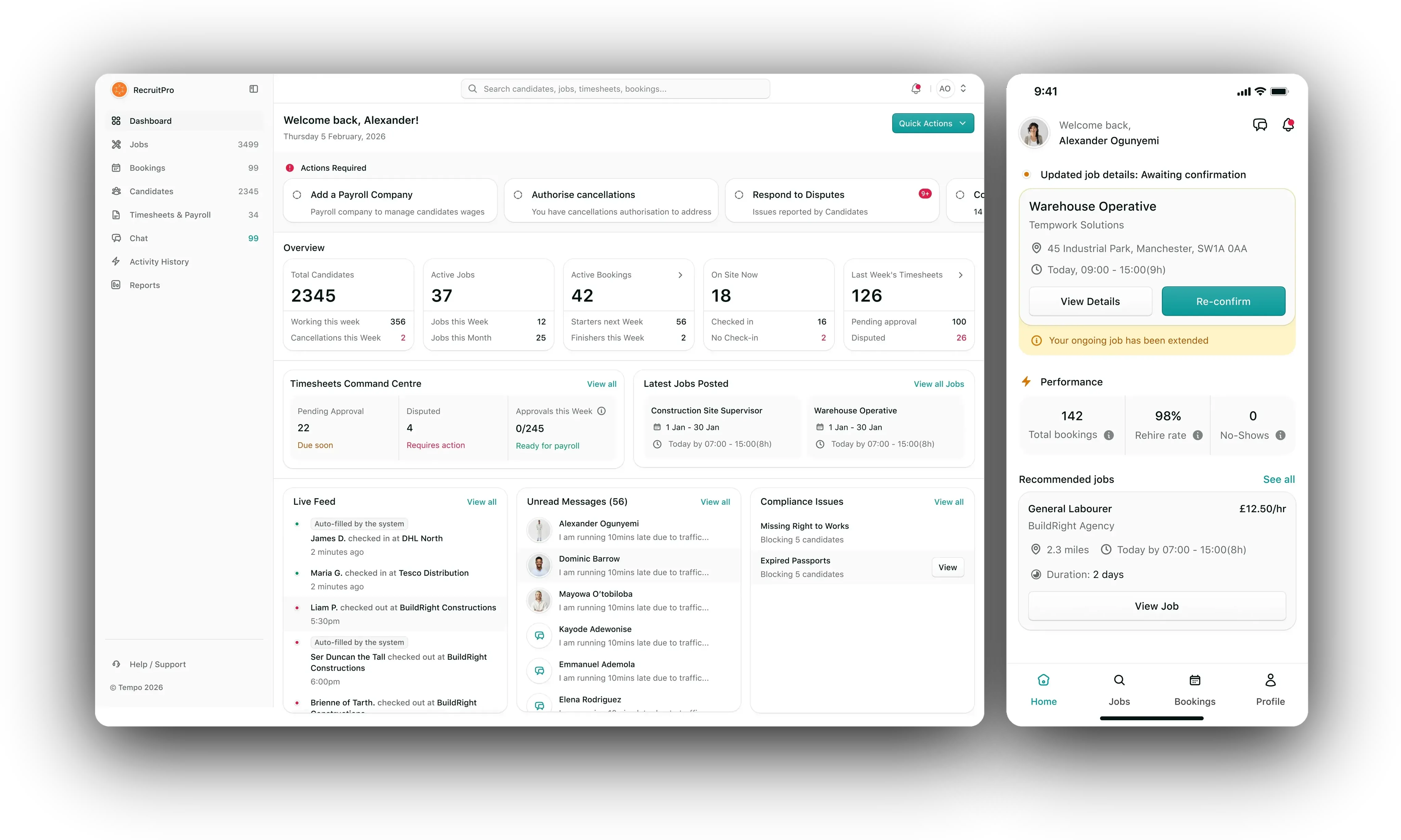
Tempo connects recruitment agencies with the temporary workers they place, on one record that the worker, the agency and the client all read.

Designed both sides from the first screen: the candidate mobile app, from right-to-work onboarding through job search, selfie check-in, timesheets and disputes, and the agency web portal, from the dashboard and job creation to candidate vetting, bookings, timesheet approval and the day-level attendance model that decides what a missed shift means.

Role
Lead Product Designer
Designed
Candidate app, agency portal
Market
UK temporary staffing
Scale
100,000+ candidates
The problem
Identity, right to work, tickets, attendance and hours all lived in different places, so an agency could place a crew on Monday and still not know on Tuesday who had turned up or which hours to pay.
What I owned
Both products end to end: the dependency map between them, the user stories every screen was built from, the candidate app from onboarding to disputes, and the agency portal from the dashboard to the attendance model.
Tempo

Overview

Tempo is a platform for temporary staffing in the UK. Agencies post jobs, keep candidates compliant and approve the hours they bill for. Candidates prove they can work, pick up shifts, check in on site and get paid. I was the lead product designer on both sides: the candidate mobile app and the agency web portal, which have to agree on every record.

The problem

Temporary work runs on phone calls and spreadsheets

An agency can place fifty people on a site on Monday and still not know on Tuesday morning who turned up.

Before a first shift, the agency has to check the worker's identity, right to work and tickets, which expire. On the day, somebody needs to know they arrived, and at the end of the week the hours have to be agreed before anyone is paid. Each of those lives somewhere different: a scan in an inbox, a consultant's phone, a timesheet that turns up on a Friday.

Tempo puts all of it on one record that the worker, the agency and the client all read. The worker's side has to be quick and forgiving, because it is used in a car park at seven in the morning. The agency's side has to be dense and exact, because that is where money and compliance get decided.

Research

Ten years in recruitment, and what other recruiters told us

Tempo's founder spent ten years in recruitment and wanted to move the work off paper, spreadsheets and phone calls.

That experience set the direction, but one agency's habits are not a whole industry. So we ran several interview sessions with other people in recruitment, agency owners and the consultants who place temporary workers every week, to understand what they needed, what they wanted, and most of all where the work hurts.

The pain points that kept coming up
  • Compliance by hand. Passports photocopied in the office or sent as phone photos, and trade cards that expired without anyone noticing until the worker was already on site.

  • Hearing about no-shows from the client. A consultant's first sign that somebody had not turned up was an angry call from site at eight in the morning.

  • Filling shifts down a phone list. Ringing candidates one by one, with no view of who was free, who was already booked, or who had let them down before.

  • Friday timesheet arguments. Hours on paper or email that did not match what the client saw, no record of where a number came from, and payroll held up until it was settled.

  • No fair way to record a missed day. One absence meant cancelling a whole booking or ignoring it, and a worker's record depended on who remembered what.

Dependency mapping

One record, several people looking at it

Before I drew a single candidate screen, I mapped what the candidate app would do to the other apps, and what they would do to it.

The candidate app, the agency portal, the client side and Tempo's operations team are views of the same bookings, documents and hours. A field left off the candidate's onboarding is a column the agency can never fill, and a status the agency can set is a state the candidate's phone has to show. So the first deliverable was a dependency map, not a screen.

Take documents. A candidate uploads a passport on the phone and the agency reviews it in the portal. Candidates can belong to several agencies, so the reviewer is warned when another agency has already rejected the same document.

A candidate's right to work documents in the agency portal, with a verified passport and a birth certificate pending review
The agency's half of a document the candidate uploaded, with the warning that another agency has already rejected it.
The candidate's half: the documents, their states, and what happens to a booking when one runs out.

Process

Stories before screens

Most of the design was decided in writing first, one screen and one state at a time.

For the candidate app I wrote every screen, field, popup and error out as user stories before drawing any of it. Nearly every empty state and failure screen in the file exists because a story asked what happens when this goes wrong.

The agency portal was broken into epics instead, which caught things the requirements never spelled out, like several consultants on one agency account with different roles. Rules that could not be drawn went onto the canvas as notes for engineering, such as “Should auto check in candidate if network fails.”

Identity verification

Job-ready from the phone

Proving the right to work used to mean a trip to the agency office with a passport. Here it takes a few minutes in the app.

A UK national goes the passport route, and anyone else uses a share code from GOV.UK. The passport is scanned and read back for the worker to confirm, and a selfie is matched against its photo.

Each step passes or fails on its own. A failed selfie shows next to a passport still in review and a right to work check that has passed, with a retry on that step only. Nobody starts again because the lighting was bad.

Two routes in, then the passport read and checked back.
The share code route, and a selfie that passes or fails on its own.
The NI number, the progress screen that shows each step separately, and the CV that can wait.
Asking for permissions with the reason first.

Candidate home

A home screen that follows the day

The top of the home screen is whatever the worker needs next, and that changes several times between breakfast and the end of a shift.

An upcoming job shows the site, the time and a countdown, and the check-in button only appears a few minutes before the start, so it cannot be pressed from the sofa. During a shift the card shows the hours worked and a check-out. Compliance breaks in above everything: a passport expiring in three days can wait, but an expired one blocks the job until it is updated.

Setup, a job coming up, a job underway, and the middle of a shift.
The weekend question, a document about to expire, and a booking the agency changed.

Check-in

Checking in at the gate

The one moment the worker, the agency and the client all care about at once.

Location confirms the worker is on site and, where the job asks for it, a selfie confirms it is the right person. A pass lands them on that day's timesheet.

Sites do not always have signal. If the network fails, the worker is checked in anyway and the day is marked as filled in by the system, so nobody loses a morning's pay to a dead spot and the agency can see how the time was recorded.

The selfie check-in, passing and failing.
A shift from the lock screen: coming up, ready, underway, and time to submit.
The same two states in the Dynamic Island.

Agency dashboard

A dashboard that starts with what needs doing

A consultant does not open the portal to admire a chart. They open it to find out what is about to go wrong.

So it leads with actions: cancellations waiting to be authorised, disputes to answer, candidates with expired documents, timesheet approvals running late. Each is a card you can act on. The overview underneath is built around exceptions too. Next to who is on site sits who has not checked in, and next to last week's timesheets sits how many are disputed.

What needs doing first, then who is working, who is on site and which hours are still waiting.
An empty dashboard, and inviting the first candidate.
Global search across candidates, jobs, bookings, clients and timesheets.

Job posting

Creating a job, and filling it

A job is written once and read by everybody: the candidate deciding whether to apply, the client confirming who is coming, and payroll at the end.

The form covers schedule, pay with a margin calculator, compliance requirements, and whether the job refills itself if somebody drops out. While you write it, it shows how much of your candidate pool is already booked, so you know before posting whether you can fill it. Applicants arrive with their re-hire rating and non-attendance record.

Writing a job, previewing it, the jobs list, and who applied.
Pending confirmation, confirmed, the activity log, and cancelling.

Hours and pay

Timesheets that show their working

Most pay disputes are really arguments about where a number came from.

So every day on a worker's week says where its hours came from: auto-filled by the system, edited by you, or manual check-in. A day the system filled asks whether the worker agrees rather than assuming yes. If the agency approves fewer hours, the worker sees both numbers and the time left to dispute: 8.55 submitted, 6.50 approved, three days left.

A week with its sources, editing a day, and an approval that changed the hours.
Under dispute, and rejected with a reason.

The agency sees the same week with the same labels, and the check-in selfie for any day beside it. Approving changed hours asks for confirmation, because the worker will see the difference. A dispute opens as a thread next to the week.

The week, the evidence, approving a change, and answering a dispute.

Attendance

What a missed day means

The hardest design problem in Tempo was not a screen. It was deciding what happens when someone does not turn up.

Cancellation started out as something that happened to a whole booking. That breaks the first time a worker booked for a month misses a Tuesday: cancelling the booking punishes a day with a month, and ignoring it leaves the client with a gap. So a booking became a set of days, and attendance, absence and replacement happen to a day while the booking carries on.

  • Absence with notice. Flagged ahead of time. Check-in is off for that day and it counts against nobody.

  • Short-notice cancellation. Within two hours of the start. A replacement can be triggered, and the worker cannot check into later days until reinstated.

  • No-show. No check-in and no notice, handled like a short-notice cancellation.

For the last two, the worker has twelve hours to give a reason and fifty-six days to add evidence, and the agency only rules once that window closes. It is deliberately slow, because the result follows a worker onto every job page an agency opens. Reinstating a worker never rewrites the day they missed.

The attendance tab, and one worker's reason and evidence.

Screen gallery

Every screen

Most of both apps, in one place.

Create account
Verify phone
Home
Browse jobs
Filter
A job
Applied
Withdraw
Bookings
Ongoing
Completed
Cancel booking
Profile
Availability
Agencies
Reputation
Chat
Voice note
Photos
Update
Maintenance
Offline
Candidates
Invited
Requests to join
Candidate map
A candidate
Bookings
Booking workers
Assign payroll
Reconfirmation
Booking details
Authorise
Users
Invite user
Reports
And the agency portal.

Reflection

Looking back

What I would keep from Tempo is the order of work: the dependency map before the candidate app, the stories before the screens, the epics before the portal. Most questions got asked on paper, where they were cheap to answer.

An operational product earns trust by being plain. The screens I would point to are a timesheet row that says where its hours came from, and an attendance decision that cannot be made too early. Those are the ones people argue about.

The screens on this page are 4x exports of the working Figma file. Names, agencies, clients and sites in them are placeholder data.

Fin